Medical admin communication, without the oversharing.

Medervia is a suite of apps for Australian clinics. Pick only the ones your practice needs, priced per clinic with no per-user fees, and every app you add makes the whole suite cheaper.

Joining is free. Each app is free for its first 14 days, with no card until you subscribe. To start a free period, we ask for your clinic's ABN.

Meet Jane. She runs the front desk, and she needed three apps, not a hundred. One minute, with sound.

On offer now

30%

Off every app for 12 months, with the code MDV-EARLY-EX1.

Founding clinic offer.

Limited number available. Applies to 12 monthly invoices from when you use it. After that, each app automatically returns to its list price, less the usual discount for having more than one app. Enter the code in your cart when you add an app. Discounts never stack: each app gets the largest one.

For practice managers and reception teams at private clinics, wherever the work is: at the desk, on a phone between calls, or in the room with the patient.

Patients need no password and no app. They open an email and enter a code, or use the tablet in your room, and keep their own copy as a PDF.

Your clinic's records are stored in Sydney, and each kind of record is kept only as long as it has to be, then destroyed.

Start with the app you need today.

See every app

30 Jun 2027

The day the verbal concession ends. From then on, every bulk-billed service needs a written or electronic agreement.

Assignment of Benefit

Send a patient the agreement for their booked services, each one named and dated. They accept it on their own phone, or on the room's tablet when they are with you, and the PDF goes to them and to you.

How it works
From
Southbank Specialists
To
Olivia Hart
Subject
Your assignment of benefit agreement

Dear Olivia,

Before your procedure on 14 August, please review and accept the assignment of benefit agreement for your anaesthetic services.

The agreement names each service and its date, and the Medicare benefit you assign to your anaesthetist, who accepts it as full payment.

Single use. Expires 21 Aug. Opening it is recorded.
Form Builder

Build your own questionnaires, consents and intake forms. Questions appear only when an earlier answer calls for them, and answers are saved as the patient goes. A signed form comes back as a PDF, whether it was sent by email or completed in the room.

How it works

Pre-procedure questionnaire

2 of 3

Have you had an anaesthetic before?

Did you have any reaction to it?

Shown because you answered yes.

Some nausea afterwards

Current medications

Saved as you go

Compose your own suite.

Add an app when your clinic needs it, and remove it when it doesn't. Have more than one app and the discount comes off every app you have, not only the new one. It applies by itself; there is nothing to enter.

Pricing in full
  1. 1 app

    List price

    The app you need most, at its list price.

  2. 10% off

    Every app, with 2 or 3 apps

    Every app costs 10% less than its list price, every month, for as long as you have that many.

  3. 20% off

    Every app, with 4 or more apps

    Every app costs 20% less than its list price, every month, for as long as you have that many.

Medervia AI

Say what you need in a sentence. Check the draft.

Ask AI, built into Medervia, drafts a form's questions, a procedure's steps or a welcome letter from one sentence, right where you are writing. You check it and accept it, or try again. It never sees a patient's details, and it never sends a thing. Prefer Claude or ChatGPT? Connect yours instead.

Medervia and AI

Every app stands on the same foundations, and the foundations are free.

Join and your clinic has these before it adds a single app. Each app you add uses them, so nothing is entered twice.

  • Contacts and patients

    One address book for patients, practitioners and the organisations you work with. Bring it across from vCard, Google, Outlook, a spreadsheet or any CSV.

  • Practitioners and locations

    Your roster, with each practitioner's provider number at each location, ready for every document that needs it.

  • Your documents, your letterhead

    Pick a document style, add your logo and colours, and every PDF any app produces carries them.

  • Messages

    Direct and group chat inside your clinic. Share a request into a chat as a card that opens it, instead of forwarding a copy.

  • Notifications, on every device

    Install Medervia on your phone or computer and know the moment a patient opens, accepts or answers. The notification itself names nobody.

  • A portal for patients

    Patients sign in with a code sent to their email, see what you have asked of them, and keep their copies. No password, no app to install.

  • An audit trail for everything

    Every change to clinic data is recorded and readable by everyone in your clinic, and when a record's retention ends it is destroyed, with the destruction recorded too.

  • Draft with our AI, or bring your ownWith Form Builder, Handbook or Welcome Packs

    Ask AI drafts questions, procedures and welcome letters from a sentence, for you to check and accept. Or connect Claude or ChatGPT. Neither ever sees a patient's details.

More about the platform

Documents worth keeping.

PDFs are how your patients, practitioners and hospitals already work, so Medervia makes them properly: on your letterhead, signed, and built to last.

  • Your letterhead on every page

    Choose one of three document styles, then add your logo, an accent colour that prints well, a typeface, and your address and footer. Every app's documents use the same style.

  • Checked before anything goes out

    An owner or admin previews the style with a sample document and confirms it. Change the style, the branding or the logo, and Medervia asks you to confirm it again.

  • Signed, with the proof on the page

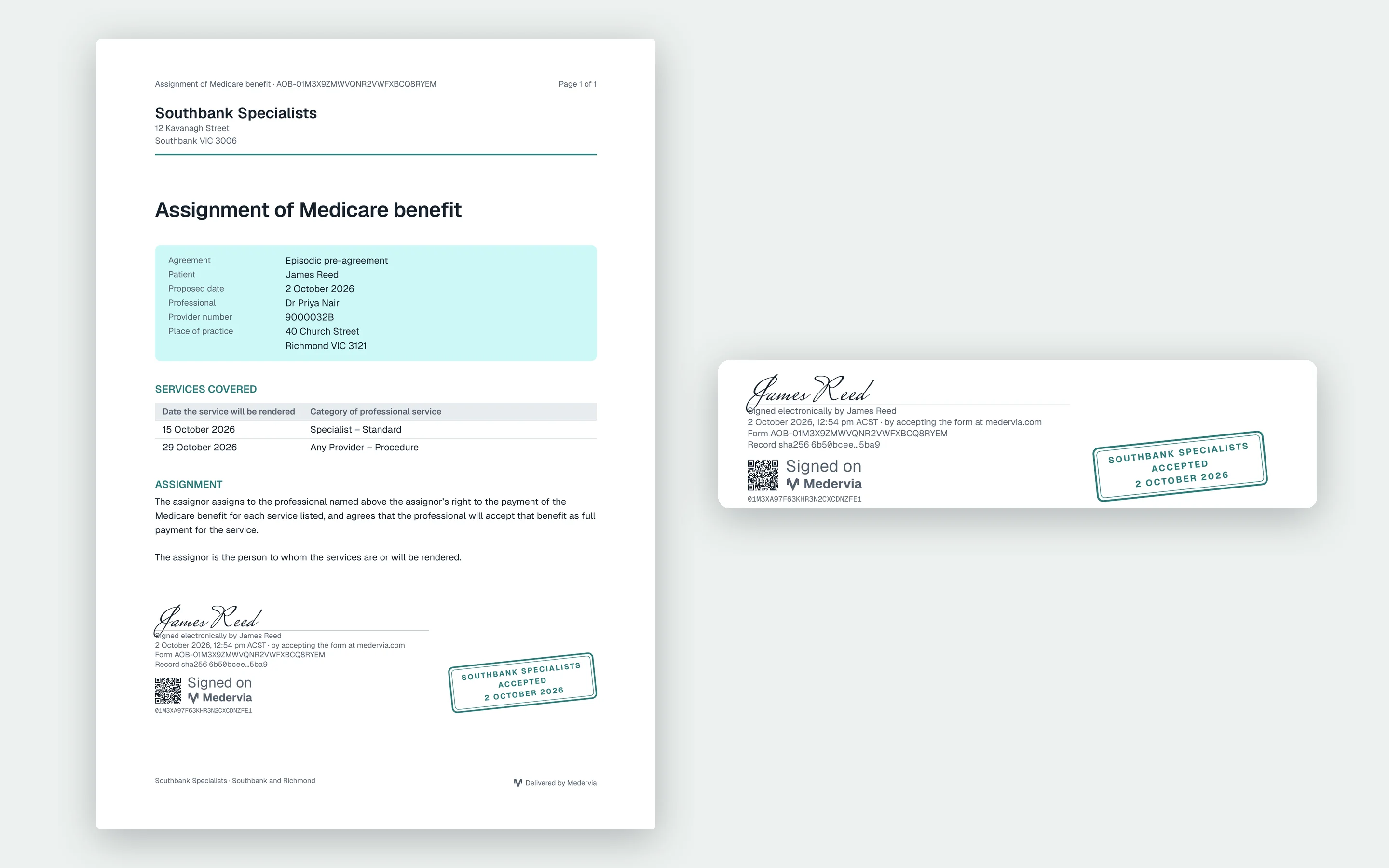
    A patient signs by typing their name. The PDF shows the signature with the date and time, how they proved their email address, and the clinic's acceptance stamp.

A signed assignment of benefit agreement on a clinic's letterhead, with the signature, the verification code and the accepted stamp enlarged beside it
An agreement as the patient and the clinic receive it.

Send only what each person needs, and show afterwards what went where.

Each patient sees their own request and nothing else. Every send, delivery, opening and answer is on the record, and when a record's retention period ends it is destroyed, and the destruction itself recorded, rather than kept forever because nothing said when to stop.

Designed with Australian healthcare privacy expectations in mind.

How we handle your records
One agreement, on the record
  1. 14 Aug 08:12Agreement sent to Olivia Hart
  2. 14 Aug 08:13Delivered
  3. 14 Aug 09:40Opened by the patient
  4. 14 Aug 09:46Accepted, PDF to patient and clinic
  5. 14 Aug 2029Scheduled destruction

Start with one app. Add the next when you need it.

Sign up with your name and email. Invite your team when you are ready.