The parts every clinic needs, before it adds a single app.
Join Medervia and your clinic has its address book, roster, letterhead, chat, notifications, a portal for patients and an audit trail, free. Every app you add works from the same records, so nothing is typed twice and nothing goes out without a trace.
Contacts and patients
One address book for patients, practitioners and the organisations you work with. Bring it across from vCard, Google, Outlook, a spreadsheet or any CSV.
Practitioners and locations
Your roster, with each practitioner's provider number at each location, ready for every document that needs it.
Your documents, your letterhead
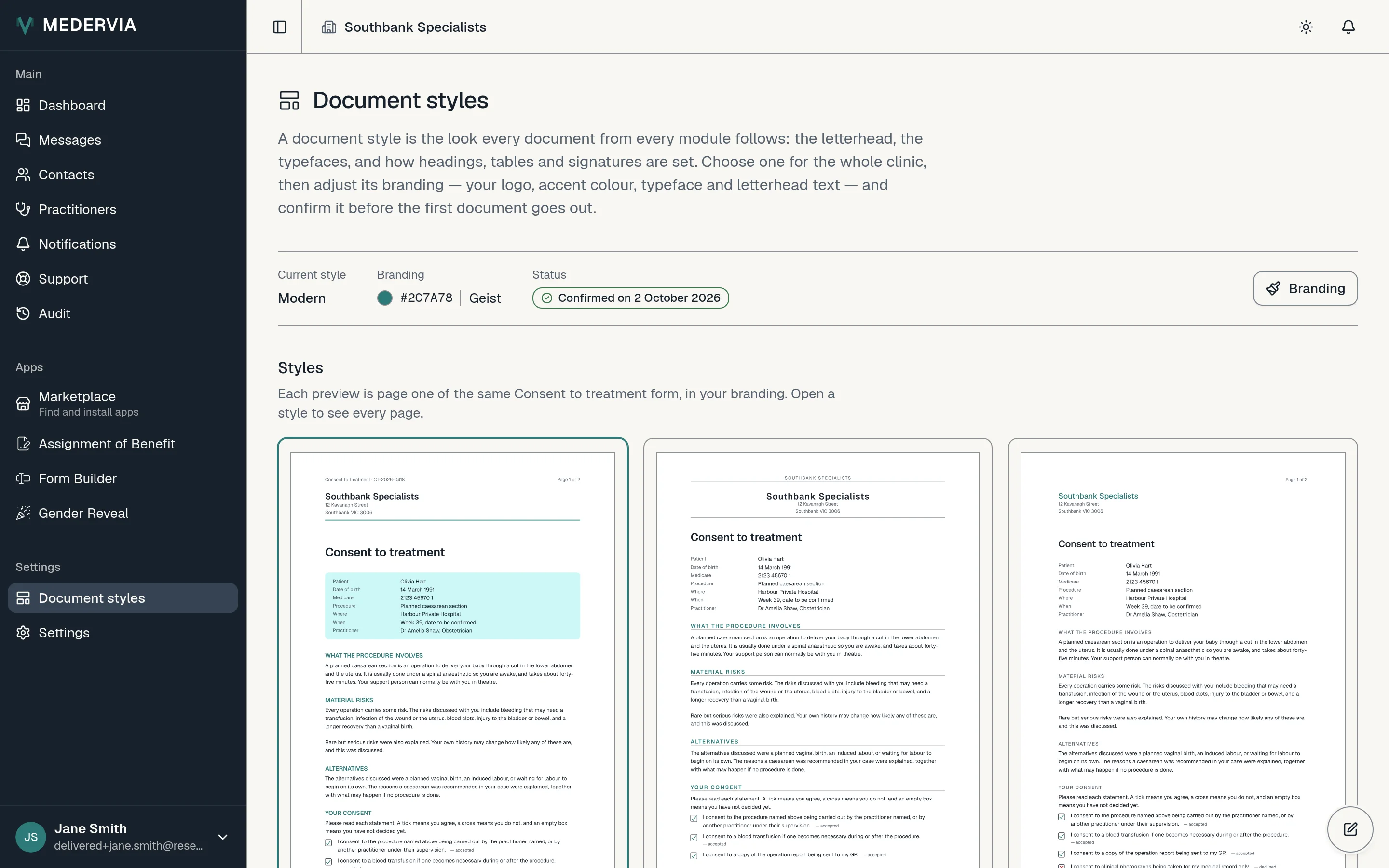
Pick a document style, add your logo and colours, and every PDF any app produces carries them.
Messages
Direct and group chat inside your clinic. Share a request into a chat as a card that opens it, instead of forwarding a copy.
Notifications, on every device
Install Medervia on your phone or computer and know the moment a patient opens, accepts or answers. The notification itself names nobody.
A portal for patients
Patients sign in with a code sent to their email, see what you have asked of them, and keep their copies. No password, no app to install.
An audit trail for everything
Every change to clinic data is recorded and readable by everyone in your clinic, and when a record's retention ends it is destroyed, with the destruction recorded too.
Draft with our AI, or bring your ownWith Form Builder, Handbook or Welcome Packs
Ask AI drafts questions, procedures and welcome letters from a sentence, for you to check and accept. Or connect Claude or ChatGPT. Neither ever sees a patient's details.
Every app works from the patient's record.
Start from the patient
Every app can be started from a patient's record or from your contacts list, with several patients ticked at once where the app sends to many. Whatever an app produces for a patient is gathered on that patient's record.
Your records stay if you stop
Cancel an app and nothing it produced is lost. Its records and documents stay with your clinic and on each patient's record, and your patients keep their copies. Only sending new ones stops.
Documents worth keeping.
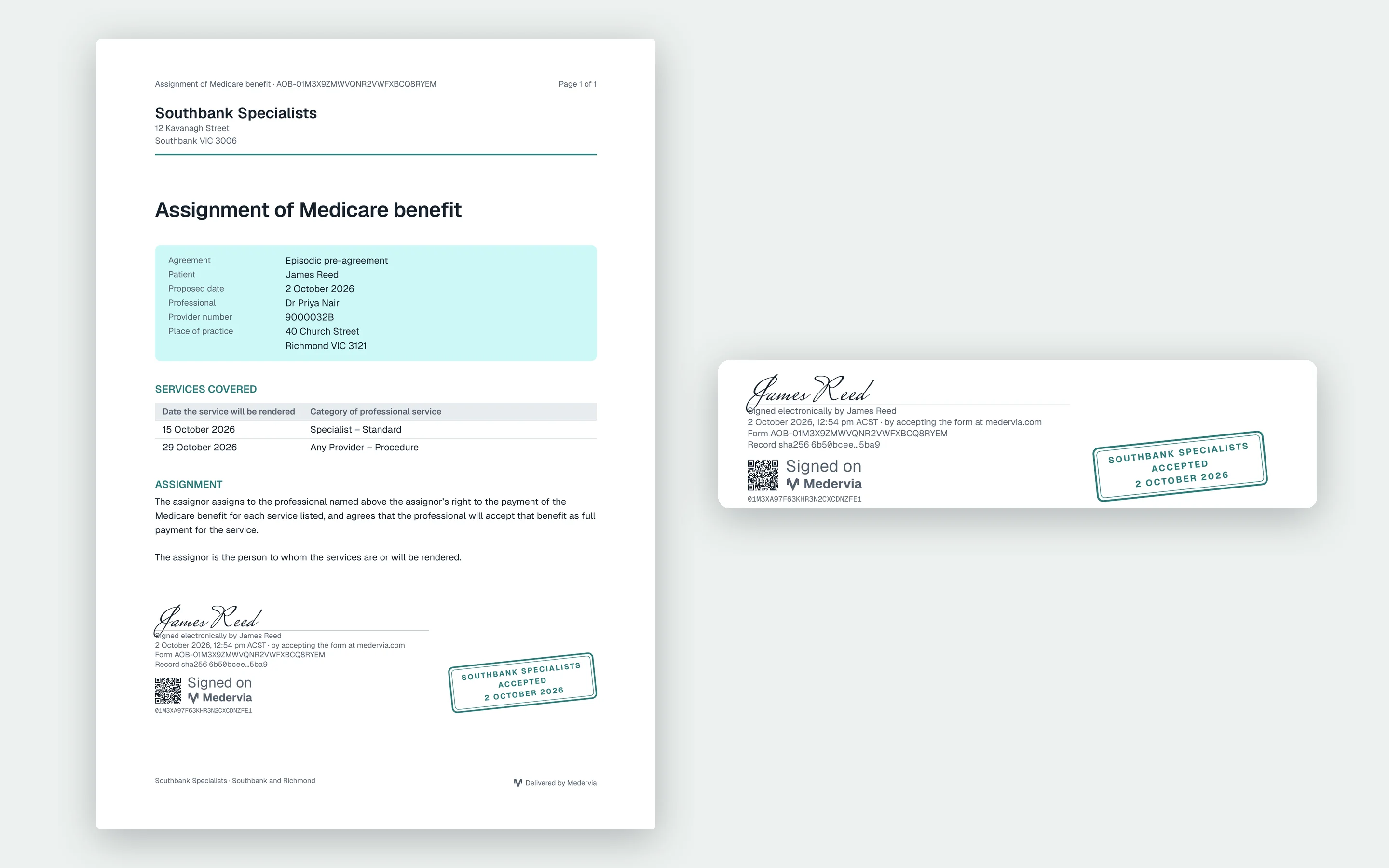
PDFs are how your patients, practitioners and hospitals already work, so Medervia makes them properly: on your letterhead, signed, and built to last.
Your letterhead on every page
Choose one of three document styles, then add your logo, an accent colour that prints well, a typeface, and your address and footer. Every app's documents use the same style.
Checked before anything goes out
An owner or admin previews the style with a sample document and confirms it. Change the style, the branding or the logo, and Medervia asks you to confirm it again.
Signed, with the proof on the page
A patient signs by typing their name. The PDF shows the signature with the date and time, how they proved their email address, and the clinic's acceptance stamp.
A code that leads back to the original
Each signed document carries a QR code that opens it on Medervia for the patient and the clinic, and a fingerprint of the record it came from.
Made to be kept
A4, tagged and accessible to screen readers, with the fonts embedded so it looks the same wherever it is opened or printed. Once issued it is never regenerated; a correction is a new document.
At the desk and between calls.
Every screen works on a phone as well as a desktop. Install Medervia from the browser and it opens like an app, with its own icon showing what is waiting, and notifications that name your clinic and never a patient.
iPhone and Android
Add to Home Screen, and the clinic's news arrives as a notification.
Mac and Windows
Install it from Chrome or Edge, or keep it in a tab. Either way, it tells you when there is a new version.
An account is a person.
Sign up with your name and email, and sign in with a code. A clinic is something you join, so a locum who works at two practices has one account and two memberships, each with its own role.
Someone who works at a clinic can also be a patient, at the same email address, at any clinic including their own. Their patient sign-in is a separate one: it shows only what was sent to them as a patient, and reaches nothing of any clinic.
- Owner
- Everything an admin can, and the clinic itself
- Admin
- Apps and billing, settings, the team and invitations
- Member
- The day's work: sending, reading, answering
Kept as long as it must be, and no longer.
Each record type has its own retention period. When it ends, the record is destroyed and the destruction itself is entered on a register, so you can show what was kept, what was not, and why.
- Every change to clinic data written to the audit trail, by the database itself
- Your clinic's records stored in Sydney, Australia
- Patient documents in private storage, reached only through short-lived links
- What is recorded about your own staff, such as a procedure they acknowledged, kept for the period you choose after they leave
- 14 Aug 08:12Agreement sent to Olivia Hart
- 14 Aug 08:13Delivered
- 14 Aug 09:40Opened by the patient
- 14 Aug 09:46Accepted, PDF to patient and clinic
- 14 Aug 2029Scheduled destruction