Guides · Medervia AI
Bring your own AI
Connect Claude or ChatGPT to draft forms, procedures and welcome letters for your clinic, without it ever seeing a patient.
An owner or admin switches AI connectors on. Each person then connects their own AI.
Switch on AI connectors
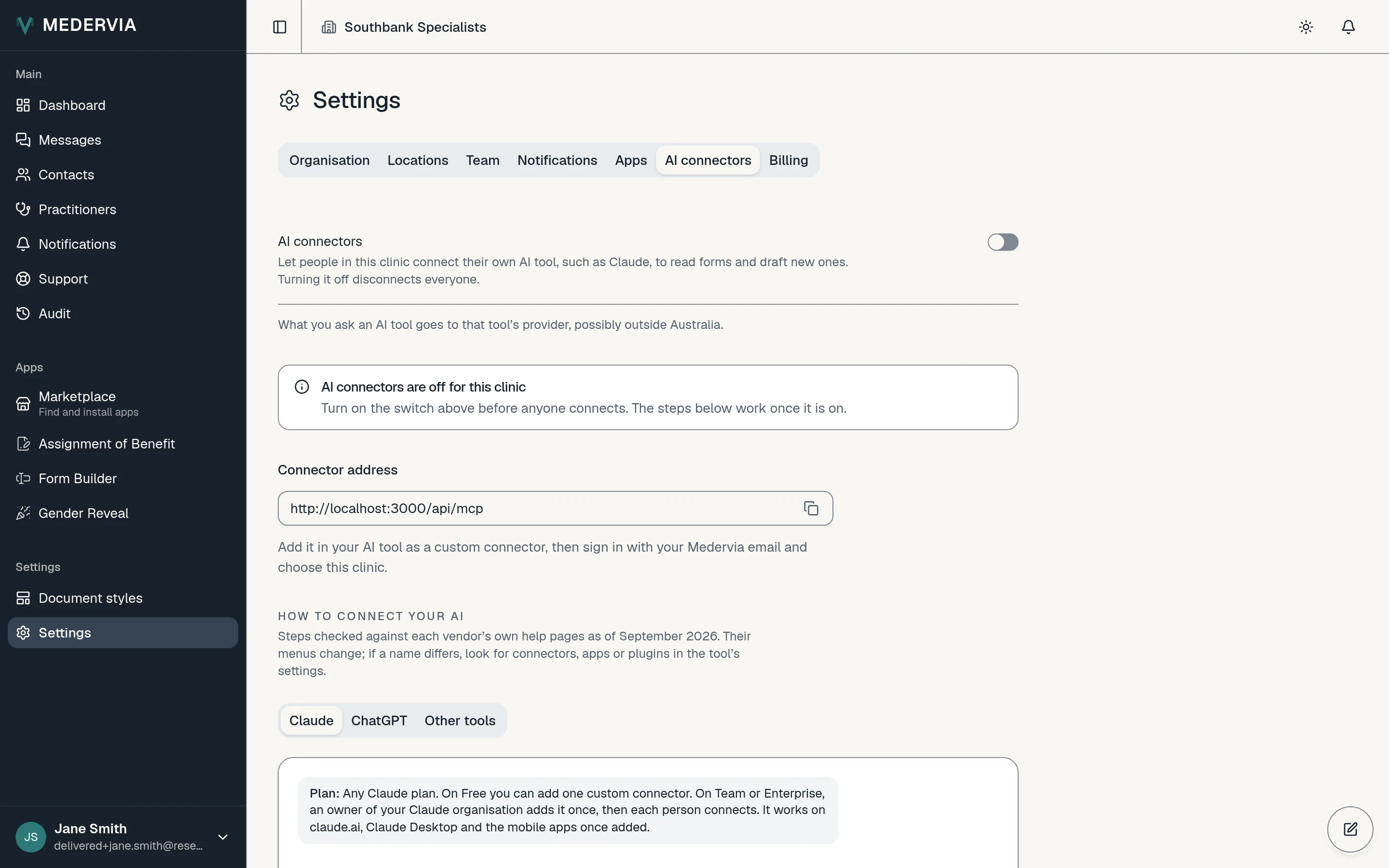
Go to Settings, open the AI tab, and under Your own AI switch on AI connectors. Copy the connector address shown there.
Add Medervia to your AI
Follow the guide on the same tab for Claude or ChatGPT. When your AI opens Medervia's page, sign in with the code you are emailed, choose your clinic, and press Allow.
Ask for a draft, or a how-to
Ask your AI to draft a form, a procedure or a welcome letter in Medervia. The draft appears in the app, where someone on your team checks it and publishes or sends it.
You can also ask how Medervia works. Your AI reads the answer from these guides.
Good to know
- Your AI can read your forms, templates, procedures and welcome letters and draft new ones, for the apps your clinic has. It cannot see patients, publish or send anything. You can disconnect it at any time from the same tab.
Next
Still stuck? Open a ticket from Support in the app, or send us a message.